 WConvert
Choose visitors by device, login status or role
Limit a campaign to the intended visitors and verify both a matching and an excluded visitor.
On this page
Before you start
Device, sign-in and WordPress role conditions are included in Free. Start with an existing campaign and decide who should see it—for example, signed-out visitors on phones.
Switching the editor canvas to Mobile only previews the design. Audience rules determine whether it can appear to a visitor.
Choose a simple audience
- Open Display rules → Who sees it?
- Choose Everyone, Phones only, Computers only, Signed-in visitors or Signed-out visitors.
- Read the summary sentence to confirm the intended audience.
- Check that the page, opening, date and frequency rules still fit that audience.
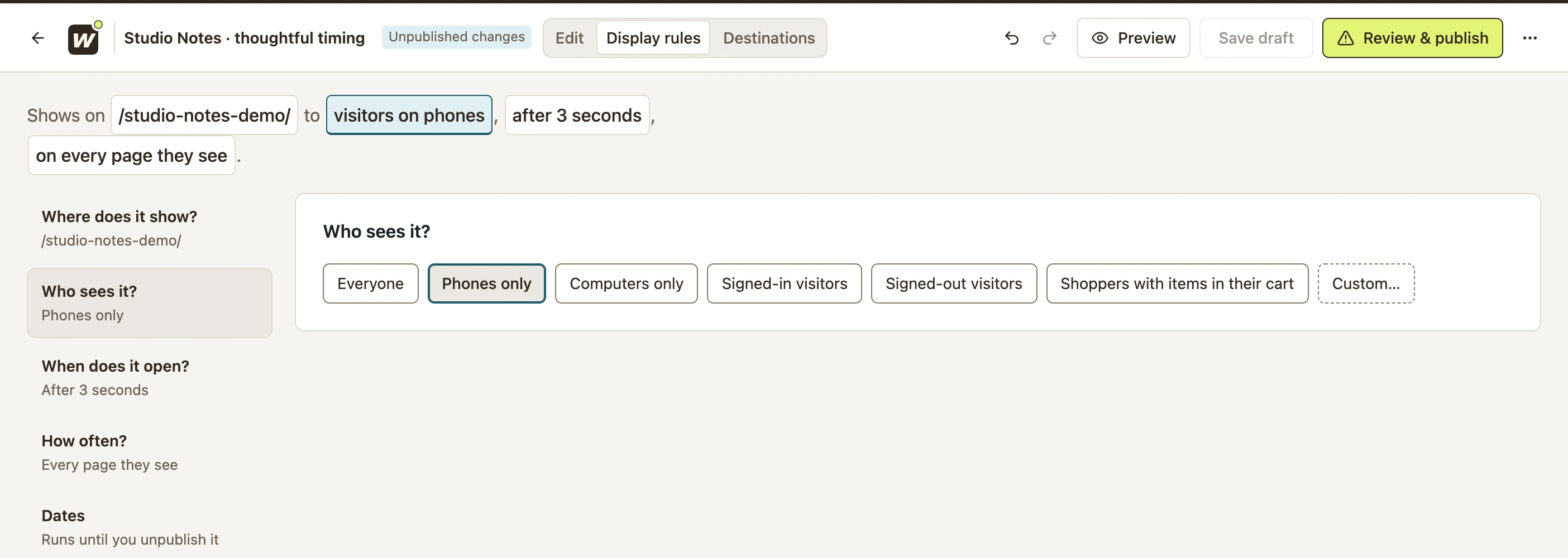 Enlarge screenshot
Combine conditions or choose a role
- Select Custom…. Review any rule carried over from the previous choice.
- In the group, select Add a rule and choose a device condition, Sign-in status or User role.
- For a role, open Any of these roles and select the roles registered on your site.
- Choose all when every rule in the group must match; choose any when one is enough.
- Add another group only for an alternative audience. Matching either group can qualify a visitor.
For “signed out and on a phone,” put both conditions in one all group. Do not use “any,” which would also include signed-in phone users and signed-out computer users.
Test included and excluded visitors
- Open Preview → Who sees it and select the matching page.
- Compare Phone and Computer for a device rule, or Yes and No for a sign-in rule. Read the reason when it does not open.
- For roles, test on the real page with accounts that actually hold the required and excluded roles. The preview cannot impersonate every account.
- Save, publish and repeat the checks on the frontend. Use a signed-out private window where appropriate.
- Allow for visitor limits so an earlier test does not look like a targeting failure.
The test passes when the intended visitor can see it and the excluded visitor cannot, with the remaining rules held the same.
Include your WConvert version, the page you tested and any error message.