 WConvert
Let visitors reopen a dismissed campaign
Add a small reminder button so visitors can return to a popup or slide-in after closing it.
On this page
Before you start
This requires Pro and a Popup or Slide-in campaign. Reopen controls are in the campaign’s Look settings. Start with a published campaign you can display on a test page.
The button appears after dismissal. It is useful when someone wants to return to an offer without waiting for another automatic appearance.
Configure the reopen button
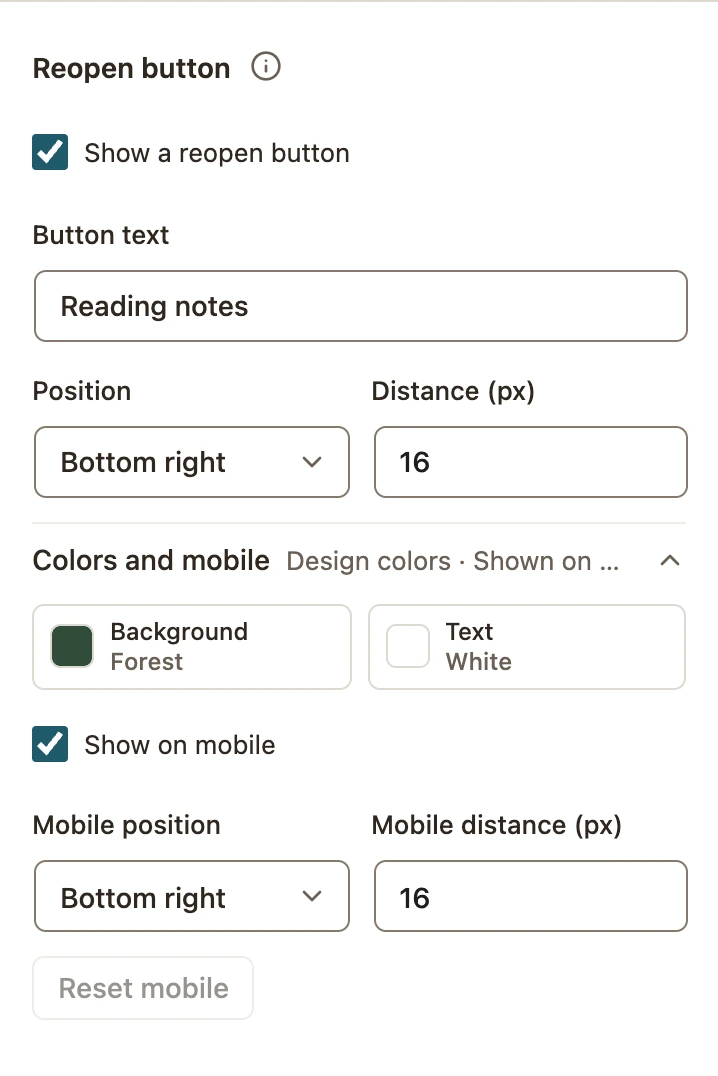
- Open Edit → Look and find Reopen button.
- Turn on Show a reopen button.
- Set a short, meaningful Button text, such as “Reading notes.”
- Choose its corner under Position and adjust Distance (px) from the edge.
- Expand Colors and mobile to review colors, Show on mobile, mobile position and mobile distance.
- Review and publish the changes.
 Enlarge screenshot
Test closing and reopening
- Open the eligible page in a fresh private window and trigger the campaign.
- Close the popup. Confirm the small reminder button appears in the chosen corner.
- Select the reminder. The campaign should open again.
- Close it, then use the reminder’s dismiss control. Confirm the reminder disappears.
- Repeat at a phone-sized viewport. If Show on mobile is off, expect no reminder there.
Check the full interaction on your actual site, including keyboard focus and overlap with other fixed elements. Preview is useful for design, but it does not replace this live test.
If the reminder does not appear
Confirm the campaign is a supported format, the setting is published and the visitor actually closed the campaign. Then check mobile visibility, schedule, audience and whether the visitor already converted.
Reopening is a deliberate visitor action, so automatic repeat pacing does not work exactly like a new automatic popup. Conversion stops and other eligibility checks can still prevent reopening. Browser/session state is local; it is not shared across every device.
For a separate button that opens a campaign before its first appearance, use click-to-open. For display restrictions, see the rules reference.
Include your WConvert version, the page you tested and any error message.