 WConvert
A recommendation,
a quiz or a reminder.
Start with the job your shopper needs help with. Pick a campaign design that fits it.
 MEET WCONVERT PRO
Help shoppers find the right product, discover a thoughtful extra and get back to their basket. Build the moment around what they’re shopping for.
Turn your product knowledge into useful recommendations. Choose the extras, set the shopping context and preview what appears.
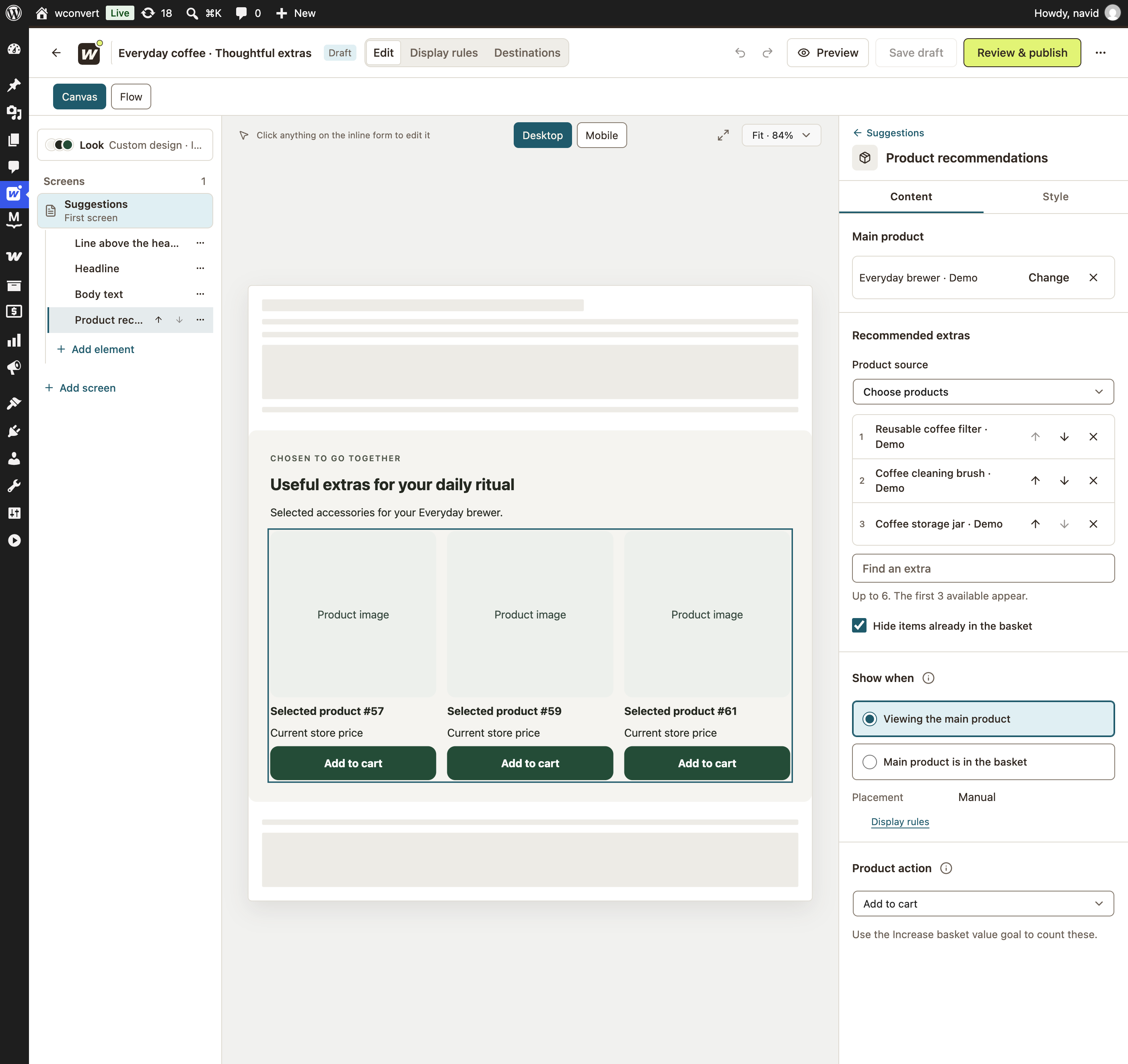
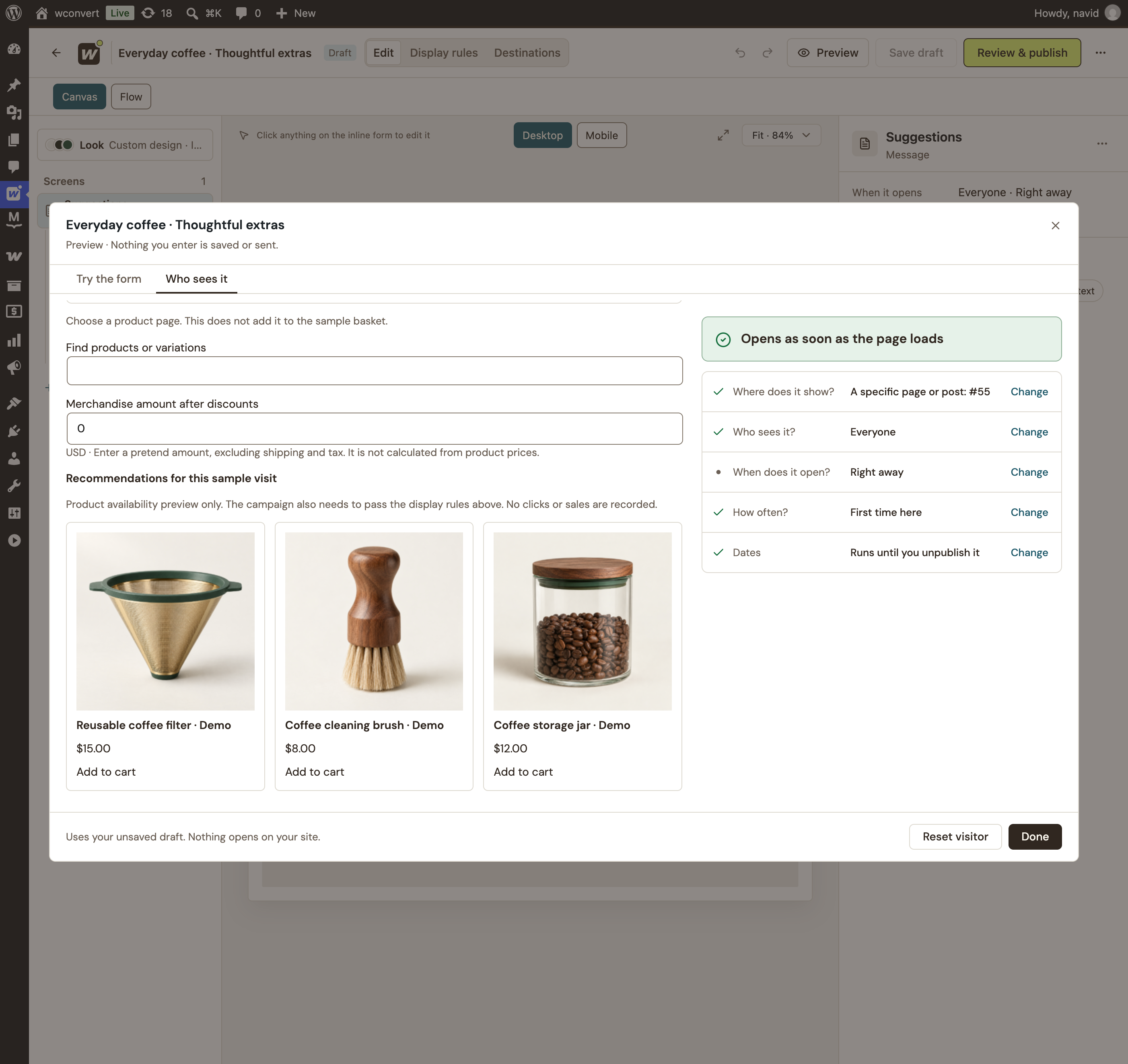
Pick products yourself or use your configured WooCommerce cross-sells. Show up to three eligible suggestions.
Recommend on a product page or match baskets by products, categories, quantities or merchandise amount.
Recommendations check current visibility, stock and purchasability before a product appears.
Skip what they already have. Products in the basket are excluded by default—try the switch below to see the suggestions change.

$15.00 · Quantity 1
The filter is still eligible for a recommendation.
Turn a big catalog into a useful conversation. Ask about their preferences, follow a relevant path and recommend products that fit the result.
Choose products for each result, or narrow the selection with categories and attributes. Let shoppers explore the product or add an eligible item.
Try the full product quizA lighter roast for a bright filter brew.
Filter · Fruity · Whole beanIllustrative result · Matches follow your rules.
Your coffee is waiting in your basket. Take another look before you go.
Illustrative on-site cart reminderA shopper with items in their basket may simply need a useful next step. Show an on-site reminder that leads back to their current cart.
This is an on-site campaign. Email and SMS cart-recovery sequences belong in your sending service.
Explore timing and targetingSee product activity without treating every interaction as a purchase. Use the evidence to refine your products and offers.
A product card was shown in the campaign.
A shopper followed a product link.
WooCommerce accepted a product addition.
Optional sales attribution links eligible orders to consented campaign interactions. These are recorded activities, not a claim of guaranteed sales uplift.Explore campaign analytics
Start with the job your shopper needs help with. Pick a campaign design that fits it.
Choose your products and how the visitor reaches them. Match the campaign to the right page or basket.
Preview the suggestions without changing a real cart. Check the complete experience on your staging site.
Product recommendations, cart conditions, product quizzes and on-site cart-return campaigns are included in Pro.
$49/ year
USD · 5-site and Unlimited plans also available.Find your Pro planStarting with a simple signup? Free includes popups, inline forms and email or SMS capture. Compare Free and Pro.
Yes. Catalog recommendations, product quiz results with WooCommerce products, cart conditions and cart-return campaigns require WConvert Pro and WooCommerce. Free still lets you create general email, SMS and offer campaigns on your WordPress site.
No. You control the recommendations. For standalone offers, choose specific products or use configured WooCommerce cross-sells. Product quiz results can use hand-picked products or category and attribute criteria. There is no automatic compatibility prediction.
Yes, for eligible simple products. A direct action adds one item after the shopper clicks. Variable products and products requiring extra options or unsupported extension-specific validation use their product pages instead. Compatibility depends on your store’s product and cart extensions.
Standalone recommendations exclude products already in the basket by default. You can adjust the basket-exclusion preference. Recommendations also check current visibility, stock and purchasability.
WConvert’s cart-return campaigns are on-site invitations with a route back to the current basket. They do not send abandoned-cart email or SMS sequences. Connected email and SMS services handle their own follow-up workflows.
Use the WConvert block or a manual placement for control over where a campaign appears. Automatic placement after a product summary is supported on classic WooCommerce product templates; block themes use the campaign block in their product template. Custom builders and cart extensions should be checked on a staging site.
Use the plugin’s sample-visit tools with a selected product page and sample basket. They evaluate the recommendations without changing a real cart or recording activity. Then check your published setup on a staging store with your theme and extensions.
No. Product views, product-link clicks and accepted basket additions are separate activities. Optional WooCommerce sales attribution uses consented, qualifying interactions and a 30-minute last-interaction window. It links eligible orders to campaigns; it does not prove that the campaign caused extra sales.