 WConvert
Display rules, groups and visitor limits
Understand how page selection, audience groups, opening triggers, dates and visitor limits work together.
On this page
Before you start
Open a campaign’s Display rules tab. Core page, device, sign-in, timing and frequency controls are included in Free. Pro adds rules such as click opening, referral and URL-parameter targeting. Cart rules also need WooCommerce.
Read the sentence at the top as a summary, then inspect each section. A matching audience alone does not mean the campaign is published, in date or placed on the page.
Understand the five sections
| Setting | What it means |
|---|---|
| Where does it show? | Select eligible pages and exclusions. A matching exclusion prevents display. Inline campaigns also need a placement method. |
| Who sees it? | Audience conditions, such as device or sign-in status. Custom groups let you combine conditions. |
| When does it open? | The opening event or delay. Automatic inline placement uses Right away. |
| How often? | Campaign repeat limits and stopping after conversion. Site-wide limits may also apply. |
| Dates | The start and end window, using the site’s configured time. Publishing and scheduling are separate checks. |
For step-by-step setup, see selected pages, visitor targeting, opening triggers and scheduling.
Read all, any and separate groups
Under Who sees it? → Custom…, each group can match all or any of its conditions. Separate groups are joined with OR: one matching group is enough.
| Setting | What it means |
|---|---|
| All: phone + signed out | Both conditions must match. A signed-in phone visitor does not match. |
| Any: phone + signed out | Either condition is enough. This also includes signed-out computer visitors. |
| Group 1: campaign tag / Group 2: no referring page | Either group can qualify. Adding the second group broadens the audience; it does not add a requirement to the first. |
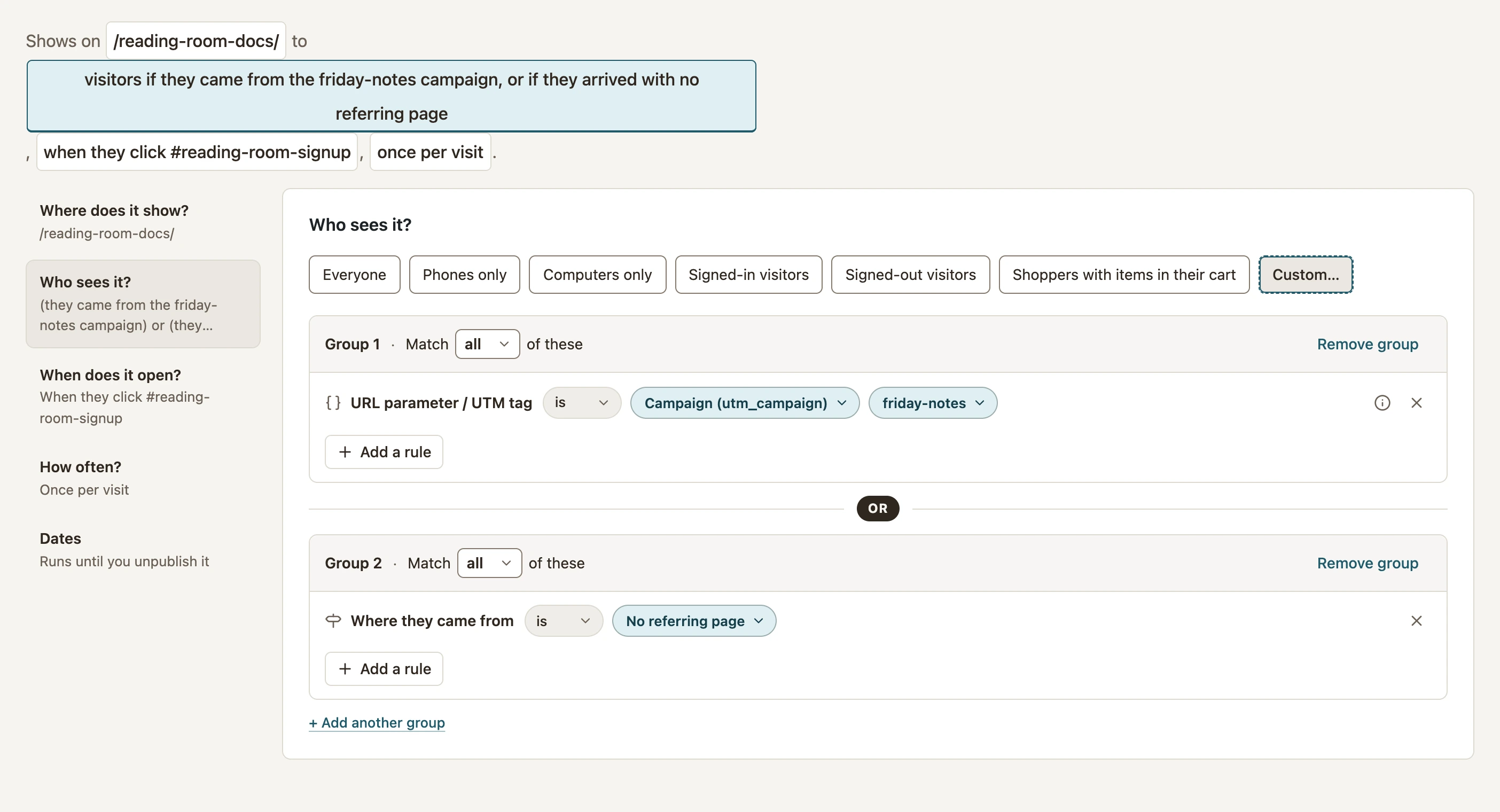 Enlarge screenshot
Use is not only when you mean to exclude the named condition. Check both a matching and non-matching visitor after publishing.
Know what advanced conditions measure
| Setting | What it means |
|---|---|
| URL parameter / UTM tag · Pro | Reads the current URL. It does not remember a tag after the visitor moves to an untagged page. |
| Where they came from · Pro | Reads the immediately previous page. Missing referrers and same-site navigation count as Direct / No referring page. |
| Ad blocker · Pro | Uses a browser-side detection signal. It is not proof of a visitor’s intent or a reliable identity. |
| Time of day | Uses the site’s time. An overnight range can cross midnight. |
| User role | A signed-in visitor holding any selected role can qualify; signed-out visitors have no role. |
| Cart conditions · Pro + WooCommerce | Use the current cart state. Do not infer a completed purchase from items in a cart. |
Separate automatic pacing from deliberate clicks
Automatic opening respects its timing and applicable campaign and site-wide pacing. A deliberate click to open or reopen is treated differently from an automatic repeat: it can bypass automatic pacing, while schedule, audience, conversion-stop and active-overlay checks still matter. The campaign must also be available on the current page.
Browser history is not a person’s identity across devices. Use a fresh private window for a first-visit test, then repeat in the same window to check limits. Inspect an unexpected result with the display diagnostic workflow; do not remove all targeting just to make it appear.
Include your WConvert version, the page you tested and any error message.