 WConvert
Forms submitted
See recorded email, phone and other capture submissions. Your sending service handles subscription confirmation.
Go beyond “how many?” Understand what visitors did, compare it with the previous period and find the campaigns worth a closer look.
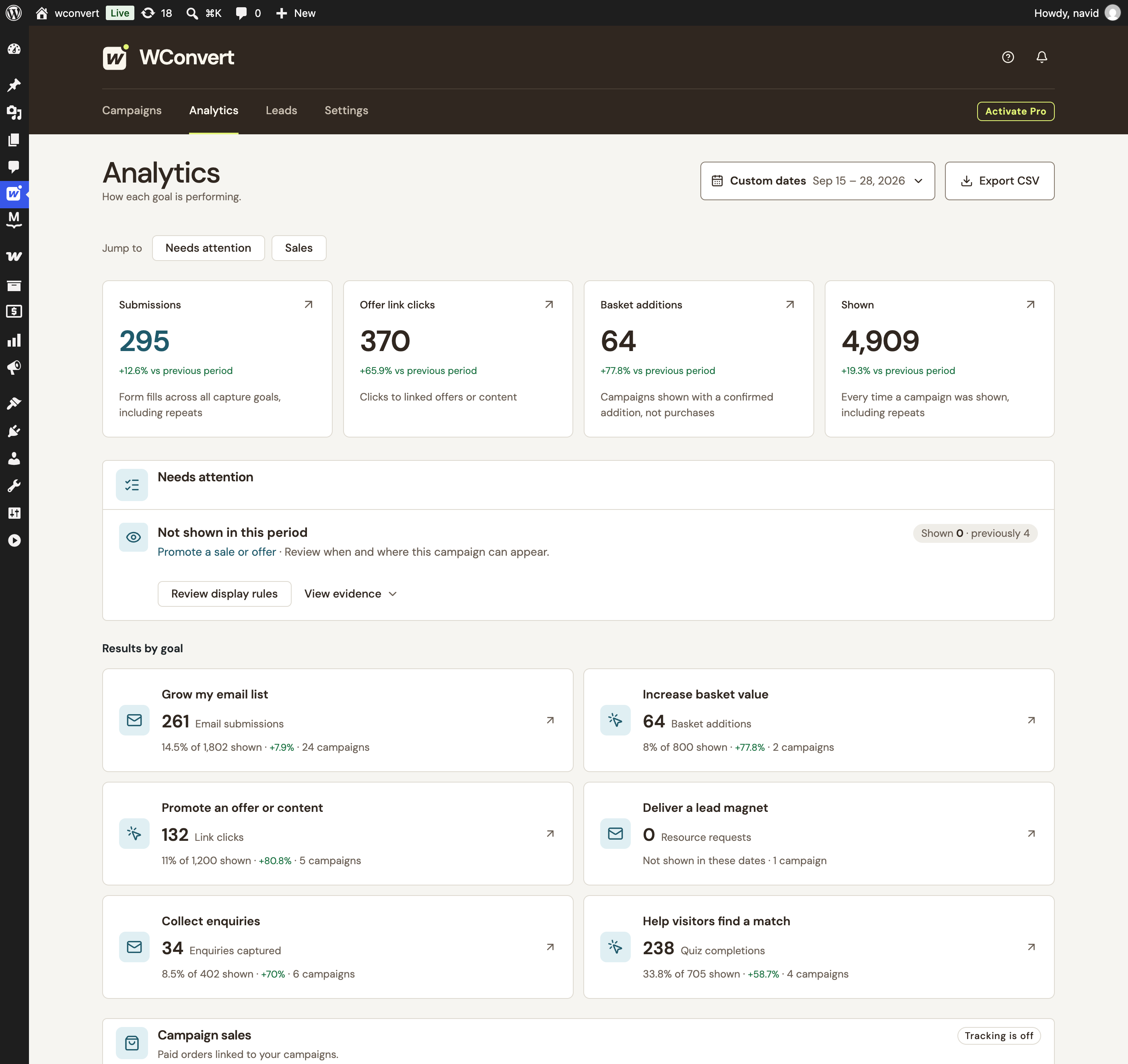
Read submissions and basket additions as separate outcomes.
Campaign analytics · Sample data
A signup, a quiz completion and a basket addition answer different questions. Keep their meaning intact instead of rolling everything into one conversion number.
See recorded email, phone and other capture submissions. Your sending service handles subscription confirmation.
Track primary offer and cart-return clicks. A click shows an action—not a completed purchase.
Understand completed quiz journeys. An anonymous result and a separately captured contact are different outcomes.
See accepted recommendation additions with Pro and WooCommerce. Product-link clicks stay separate.
Compare equal periods and read the count alongside the rate. A lower total doesn’t automatically mean a weaker response.
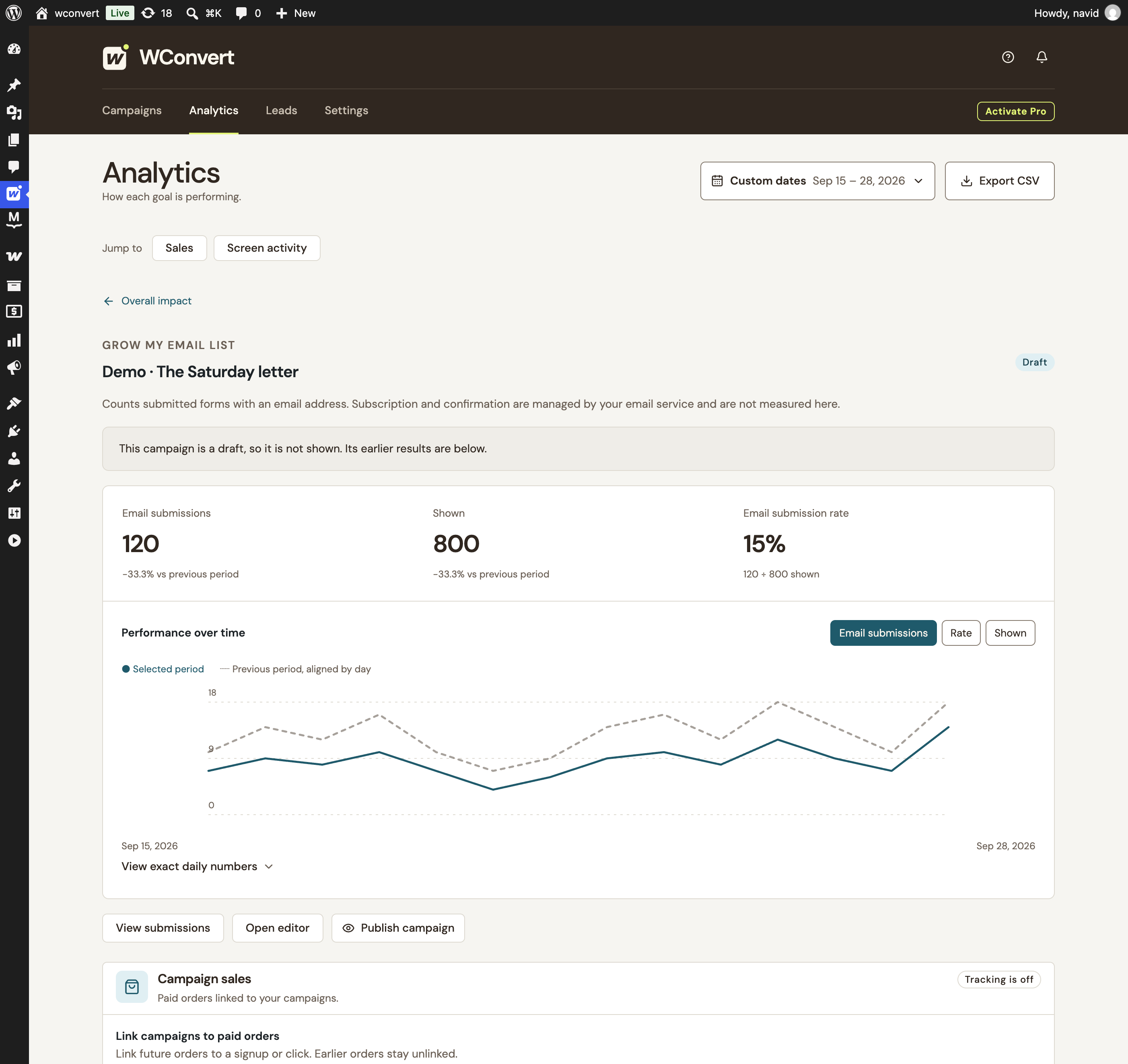
Real campaign report with local demo data. The explanation beside it shows how to read the numbers.
Each bar pair uses its own scale. Counts describe actions and appearances, not unique people.
120 out of 800 appearances led to a submission, compared with 180 out of 1,200. Both periods have a 15% submission rate.
Review which pages and visitors can see the campaign, alongside your site’s traffic. The report alone cannot tell you why exposure fell.
Sample numbers explain the reporting approach; they are not customer results. WConvert’s observations use evidence thresholds and never change a campaign automatically.
Open the goal or campaign behind a number. Follow its trend, inspect the daily figures and export the report when you need it elsewhere.
Explore A/B testingComplete days, explicit dates and an equally long previous period. Paused and deleted campaign history stays inspectable.
Explore recorded screen activity and retained choice answers. These are activity counts and respondent summaries, not a guessed abandonment funnel.
Export the core outcome report as CSV. Share the selected period and comparison without turning it into an export of personal lead details.
Native results, date comparisons, campaign detail and core report exports. No Google Analytics account needed.
Start with FreeSend supported events through an existing GA4, Google Tag Manager or Plausible setup. Consent and tracker settings remain part of your setup.
Optional, consent-based sales attribution uses a 30-minute last-interaction window. Linked sales are not proof of incremental revenue.
Explore store campaignsYes. Native campaign analytics, reporting-period comparisons and core report CSV exports are included in Free. Pro adds A/B testing, optional external analytics events and optional WooCommerce campaign sales reporting.
Recorded submissions divided by campaign appearances in the selected period. Appearances and submissions may repeat, so this is not a unique-person conversion rate. With no appearances, WConvert shows a dash rather than 0%. Each goal’s rate names the outcome being measured.
The Analytics screen compares complete days in your WordPress site’s calendar. The comparison uses the immediately preceding period of the same length, avoiding a partial day being compared with a full one. This is not a real-time visitor monitor.
Native reporting uses daily counters separately from the lead log. Erasing a lead does not subtract its historical counter. Retained-answer summaries are different: they use the leads still stored on your site, so retention and erasure can change those summaries.
No. Evidence-based observations can point to something worth checking, subject to data thresholds. They do not establish a cause or statistical significance, and they never edit or publish a campaign automatically. You decide what to change.
Yes. Export the accepted reporting period and scope as CSV, including comparison values when enabled. The core report export is separate from a lead export and does not include the optional WooCommerce revenue report.
No. Native reports work inside WordPress. With Pro, you can optionally send supported campaign events through your existing GA4, Google Tag Manager or Plausible setup. WConvert does not install a tracker, and provider counts can differ because of consent, blocking and configuration.
Optional Pro tracking links eligible paid orders to a qualifying campaign interaction within a fixed 30-minute window. It is off by default and requires WooCommerce, an initialized WP Consent API policy and statistics permission. Sales figures use order data and account for supported refunds. Attribution is a connection, not proof of extra sales caused by a campaign.
Start with campaign creation and local reporting in Free. Add Pro when you need more ways to test, connect and sell.
Find your WConvert plan