 WConvert
What WConvert stores, sends and counts
Understand saved submissions, browser display history, reports and service copies, and find the data summary for your site.
On this page
Before you start
This reference covers the core data controls in Free. Installed Pro features and configured services can add data flows. Open the actual site you are reviewing; two installations may show different rows.
The aim is to identify where information is held and what each count means. For instructions on notices and policy wording, use Review the privacy guidance.
Read your site’s data summary
- Open WConvert → Settings → Data & privacy.
- Expand What visitor data is stored.
- Read What is stored, Why and How long.
- Continue to Sent to other services. Compare those destinations with the ones selected in each campaign.
- Expand More detail for browser storage and other implementation details.
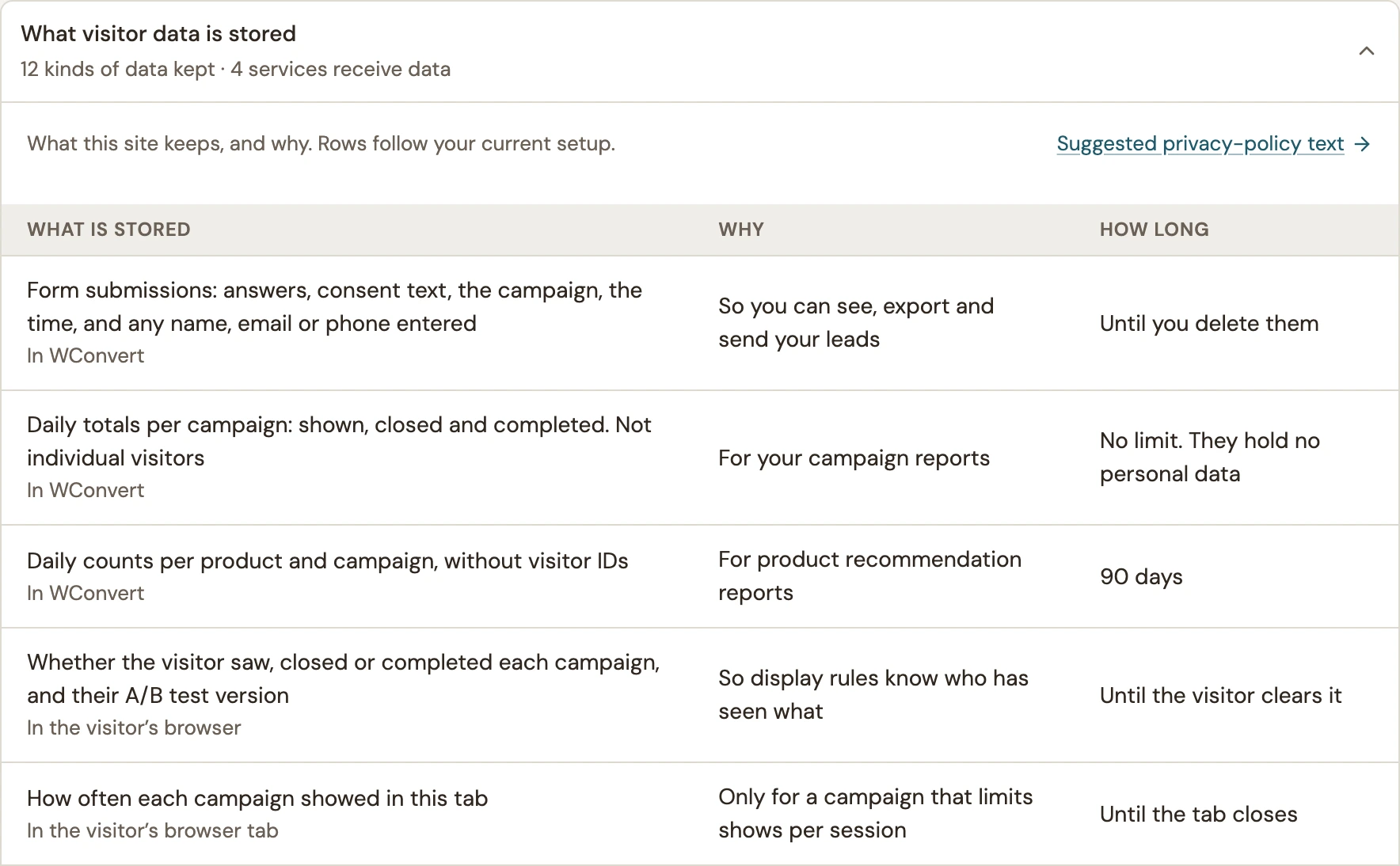 Enlarge screenshot
Separate the places data lives
| Data | Where and why | How long |
|---|---|---|
| Submissions | In WConvert: entered contact details, answers, consent wording, campaign and submission time. | Until deleted, or according to the site’s submission-retention setting. |
| Campaign totals | In WConvert: daily campaign activity for reports. These totals are not a list of individual visitors. | No built-in time limit; removing submissions does not erase these aggregate totals. |
| Display history | In the visitor’s browser: whether campaigns were shown, closed or completed. It is separate from the saved lead. | Local display history remains until cleared. Per-session counts normally last until the tab closes. |
| Protection data | Short-lived one-way codes for request and resource-send limits; approximate protection counts. | The data summary lists each duration. Protection activity resets after 24 hours. |
| Destination copies | At the selected destination or its sending service, based on that campaign’s fields and configuration. | Controlled separately by that service and its configuration. |
Browser storage details
The core display history does not contain contact details or a visitor ID. If local storage is blocked, a fallback cookie can retain that history for up to 365 days. Browser tab restoration can also restore session storage. Installed features may add A/B assignments, content-unlock or cart-related state; read the additional rows on your site.
WConvert submissions do not include the page address, IP address or browser details. This does not describe every log your host, WordPress plugins or connected services may keep.
Interpret services and counts
Sent to other services describes configured destinations and the fields they can receive. It is a configuration summary, not proof that a particular submission was sent. Confirm the campaign’s selected destination and read its send history.
If configured, bot verification receives browser/network information and verification tokens rather than form answers. An external analytics integration has its own consent and event settings. These optional service flows are separate from WConvert’s own reports.
Campaign reports count the actions named by their metric. Shown is not unique visitors, submissions are not confirmed subscribers, and email handoffs are not inbox arrivals.
Check the boundaries on your site
- Note a published campaign’s fields and chosen destinations.
- Submit a controlled test and inspect its saved record in Leads.
- Check the selected receiving service separately if the campaign forwards data.
- Compare the data summary and current retention setting with what you found.
- Repeat this review when you add a service or enable another feature.
For a request from one person, follow personal-data export or personal-data erasure.
Include your WConvert version, the page you tested and any error message.