 WConvert
Erase someone’s personal data
Remove submissions for one exact email or phone number and understand what remains in reports and other systems.
On this page
Before you start
You need permission to manage WConvert and a verified request identifying the exact email address or phone number to remove. Use a staging site and fictional data to practise.
Use the WordPress email request
- Open Tools → Erase Personal Data, or follow WConvert → Settings → Data & privacy → Erase personal data.
- Enter the requester’s email and leave the confirmation email selected.
- Choose Send Request. Wait for the requester’s confirmation before processing it.
- On the confirmed row, choose Erase personal data.
- Read the result, including any items another plugin retained. Check WConvert’s Leads list for the same address.
WordPress runs registered erasers from multiple plugins. A retention notice elsewhere does not by itself mean WConvert kept the matching lead. Review each explanation rather than treating the overall message as proof that every system is empty.
Delete by an exact identifier in WConvert
- Open Leads and search for the email or phone number.
- Open a matching submission and check the identifier carefully.
- Choose Delete all from this email, or the corresponding phone action.
- Read the identifier and matching count in the confirmation. The deletion applies across campaigns, even if your list was filtered.
- Choose Delete permanently only when the scope matches the request.
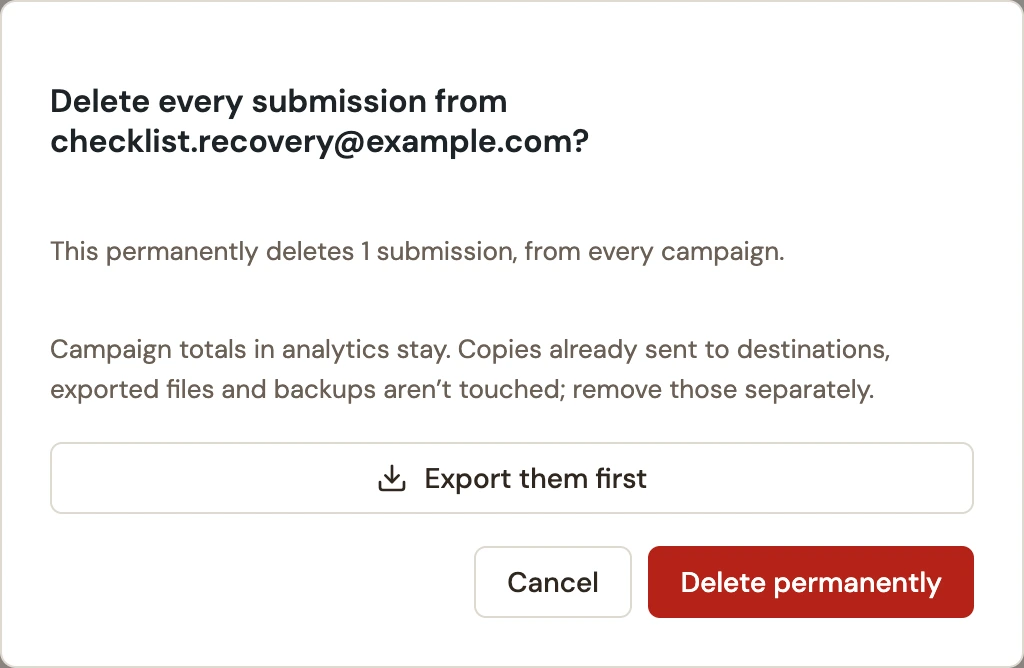 Enlarge screenshot
The dialog can offer Export them first. Create another copy only if your handling process requires it, and manage that copy separately.
Verify and follow up
Clear campaign and date filters, search the same identifier again and confirm that no matching submissions remain. A future new signup can create another record.
| Item | Result |
|---|---|
| Matching saved submissions | Removed by exact email or exact phone. The operation does not infer a person’s other identifiers. |
| Related delivery-failure records | WConvert clears failure references for the matching removed leads. |
| Campaign aggregate totals | Remain in WConvert analytics. |
| Connected services, exports and backups | Not erased by this operation. Review them separately. |
| Browser state | Visitor frequency and other browser-local state are not an email-based identity record to erase here. |
If someone used both email-only and phone-only forms, check each verified identifier. See personal-data exports for the matching export workflow.
Include your WConvert version, the page you tested and any error message.