 WConvert
Choose how long submissions are kept
Review the shared retention policy, choose a period and understand which records automatic cleanup removes.
On this page
Before you start
Retention is included in Free and applies to submissions from every campaign. Decide how long you need those records before changing the setting. There is no universal period suitable for every site.
Choose the policy
- Open WConvert → Settings → Data & privacy.
- Find How long submissions are kept.
- Choose Keep them until I delete them, or Delete them automatically after.
- For automatic deletion, select a preset such as 30, 90, 180 or 365 days, or choose Custom and enter a valid whole number of days.
- Select Save retention.
The heading describes the currently saved policy. Selecting another option prepares a change; use Cancel changes if you decide to keep the existing setting.
Review the deletion confirmation
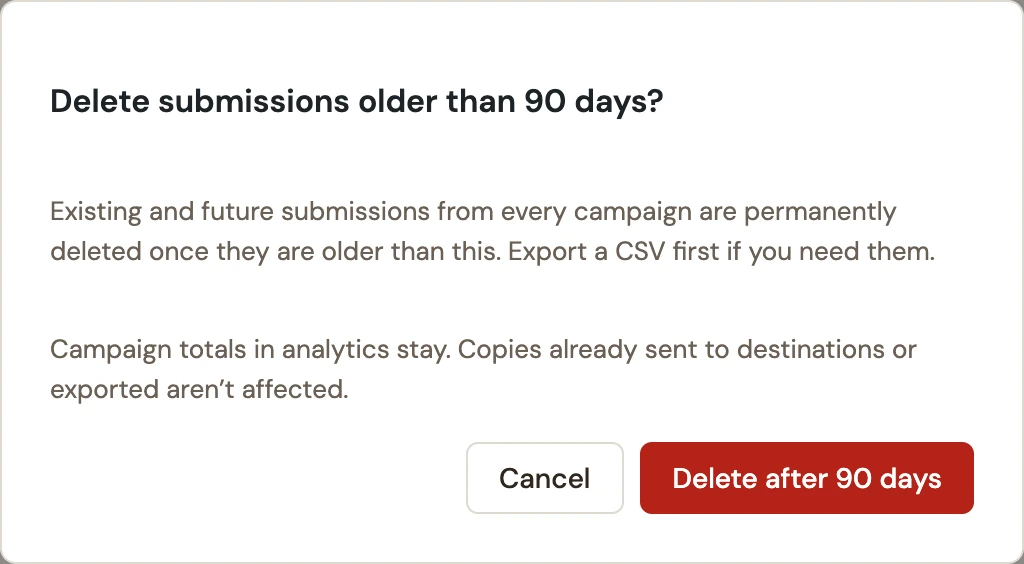
For automatic deletion, WConvert asks you to confirm the chosen period. Read the scope and select Delete after … days only when it matches your intended policy. Select Cancel to leave the policy unapplied.
 Enlarge screenshot
A daily cleanup removes older submissions. The setting is not a promise that a record disappears at the exact second it reaches that age.
Know what the policy affects
| Data | Effect |
|---|---|
| WConvert submissions | Older records from all campaigns are removed by scheduled cleanup. |
| Campaign analytics totals | Aggregate totals remain when old submissions are removed. |
| Connected services | Copies already sent to MailPoet or another destination are managed in that service. |
| CSV files, email logs and backups | These are separate copies and need their own retention process. |
Verify the saved policy
- Reload Data & privacy and check the saved policy summary.
- If testing cleanup, use a disposable staging site with known sample records. Check the expected age boundary after a scheduled cleanup has run.
- If old records remain beyond the expected cleanup cycle, ask the site administrator to check WordPress scheduled tasks.
- Review any privacy-policy wording that describes how long you keep form submissions.
Switching back to manual deletion stops future automatic cleanup after the change is saved. It does not restore records already deleted.
Include your WConvert version, the page you tested and any error message.