 WConvert
Read product views, clicks and cart additions
Understand the product activity table and verify what one product interaction records.
On this page
Before you start
You need Pro, WooCommerce and a published campaign that displays product cards, such as a product-extras offer or quiz result.
The report measures interactions with campaign product cards. It is separate from a store-wide WooCommerce sales report.
Open the campaign’s product activity
- In Campaigns, open the intended campaign’s report, or select it in Analytics.
- Choose a date range. Use Today for an action you just tested.
- Choose Product activity in the report’s section navigation, or scroll to that table.
- Check the date and tracking-start notice before comparing rows.
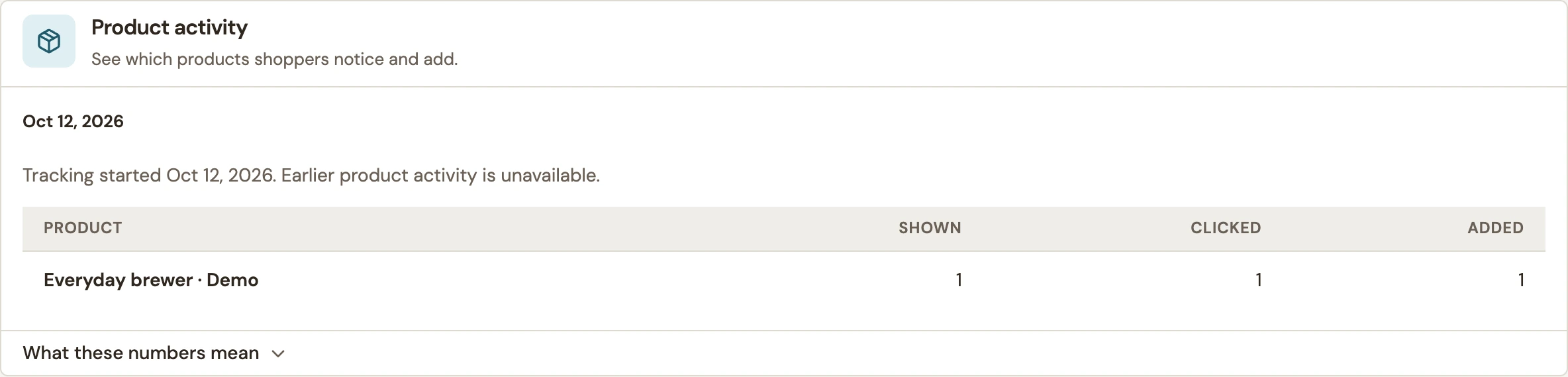 Enlarge screenshot
Read the three columns
| Setting | What it means |
|---|---|
| Shown | A visible campaign card showed the product. Counted once per product in each campaign appearance. |
| Clicked | The visitor opened that card’s product-page link. Counted once per product in each campaign appearance. |
| Added | WooCommerce confirmed a product addition from the campaign. A button press by itself is not enough. |
These are activity counts, not unique shoppers. One person can see an offer several times. Product additions and the campaign’s goal results have different counting rules, so their totals need not match.
Understand the report’s limits
| Setting | What it means |
|---|---|
| History | Product activity is retained for 90 days. The oldest included day can be partial. |
| Tracking start | Earlier activity is unavailable; enabling a feature does not reconstruct past visits. |
| Product names | Names reflect the current catalog. A rename can change the name shown beside earlier activity. |
| Missing activity | Preview is not counted. Blocked tracking, unavailable scripts and excluded automated traffic can also leave gaps. |
| Large reports | If the report asks you to narrow the period because too many products are involved, select a shorter range. |
Added does not mean checkout, a paid order or revenue. Campaign sales reporting has its own setup and consent requirements.
Verify one interaction
- Note the campaign and time. Open its published page in a normal signed-out browser and show the product card.
- Click the product link and confirm the destination.
- On another eligible appearance, add a product through the campaign. Wait for confirmation and verify it in the basket.
- Refresh the campaign report with Today selected and inspect the relevant product row.
Allow requests to finish before leaving the page. If a repeat visit hides the campaign, check frequency and completed-goal limits rather than assuming product tracking failed.
Related: goal and screen metrics and different or missing counts.
Include your WConvert version, the page you tested and any error message.