 WConvert
Show campaigns based on cart contents or value
Use WooCommerce cart conditions and test a matching basket against one that should not qualify.
On this page
Before you start
You need Pro, active WooCommerce, published products and a test campaign. Use a browser with a real WooCommerce basket. Decide whether the offer depends on having an item, a particular product or a minimum basket value.
Page rules and inline placement still apply. A matching basket does not place an inline form on a page for you.
Choose a simple or custom cart rule
- Open Display rules → Who sees it?.
- For any nonempty basket, choose Shoppers with items in their cart.
- For a more specific offer, choose Custom…, then Add a rule.
- Choose a cart rule, enter its value or select its products, and complete the group’s match setting.
- Check the sentence above the rules, then review and publish.
| Setting | What it means |
|---|---|
| Cart | Whether the basket has items. |
| Cart total | A minimum total in the store currency. For example, 200 means at least 200, not exactly 200. |
| Products in the cart | Choose products or variations and match any of, all of or none of the selected items. |
| Categories in the cart | Match selected product categories. Check whether descendants are included. |
| Total item quantity | Use a minimum, maximum or range for the total quantity. |
| Products after discounts | Use the discounted product amount, rather than assuming it is the same as the full cart total. |
Combine conditions deliberately
Use Match all when both rules must be true. For example, require the Everyday brewer and a cart total of at least 200. Use any when either rule is sufficient.
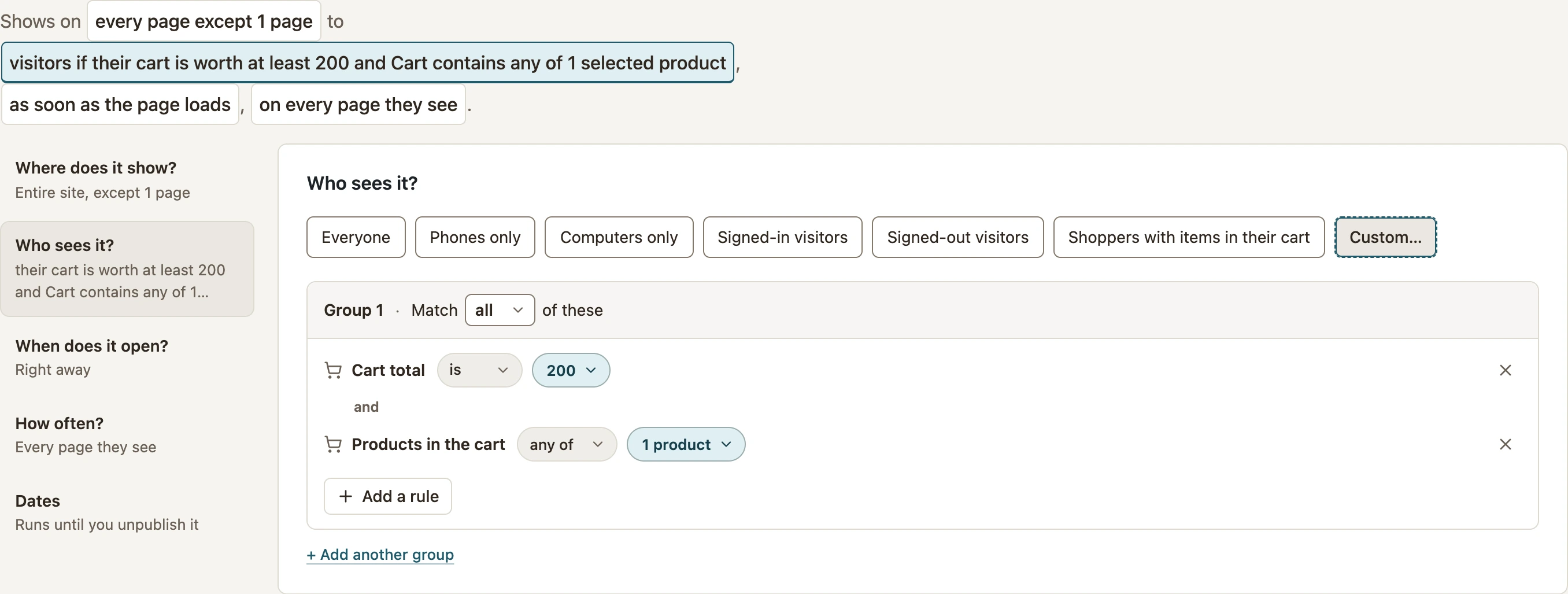 Enlarge screenshot
Separate groups are alternatives. Keep the number of groups small enough that you can explain which basket should qualify. See the display rules reference for combinations and exclusions.
Test matching and nonmatching baskets
- Start with an empty basket in a fresh session. Check that a nonempty-cart offer stays hidden.
- Add the required product and visit the campaign’s test page. For a minimum-value rule, keep the total below the threshold and confirm it stays hidden.
- Add enough to cross the threshold. Reload the page and confirm the offer appears.
- Remove or change the qualifying item and test again. For product rules, also test a basket containing only another product.
- Check coupons, taxes and shipping when they affect the amount your rule uses.
Repeat limits and completed conversions can hide the campaign on later tests. Use a fresh session or the display inspector to distinguish those limits from a cart mismatch. An unavailable cart context is not treated as a known empty basket.
Next: offer useful product extras.
Include your WConvert version, the page you tested and any error message.