 WConvert
Run an A/B test and choose a variant
Compare one campaign change, test both versions, and choose which version should stay active.
On this page
Before you start
You need Pro and a campaign you can test on a controlled page. Choose one question, such as whether a clearer headline helps visitors start a quiz. Keep the offer, audience and timing comparable. You can also compare different templates; a headline-only test makes it easier to understand the effect of that one change.
Decide what result matters before starting. A form submission, quiz completion or link click is not automatically a sale.
Watch the walkthrough
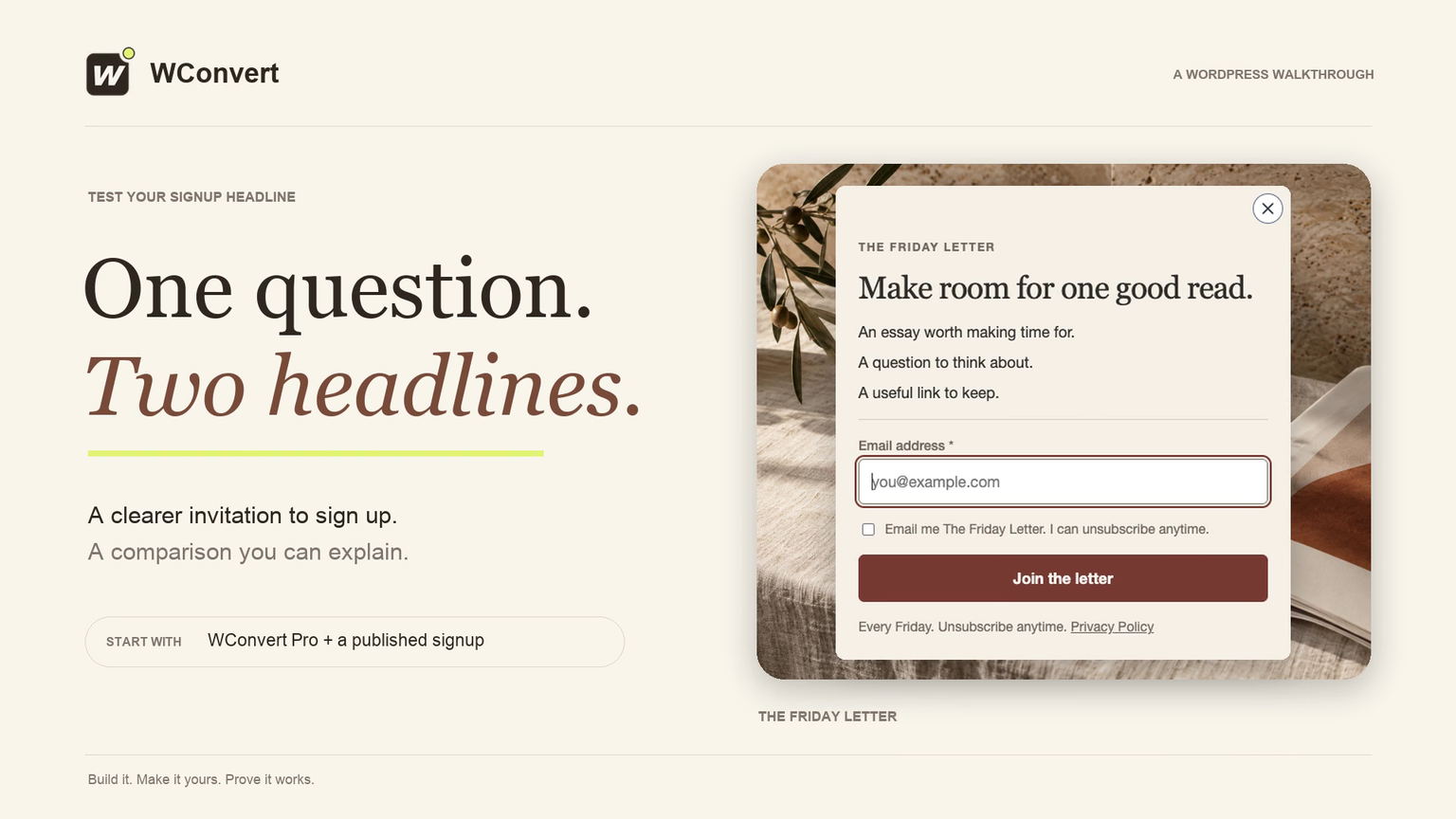
In 3 minutes 18 seconds, compare two signup headlines for The Friday Letter. Create and publish a B variant, test both live forms, compare counts and rates over the same dates, then choose and retest a version. Requires Pro and a published signup campaign.
Read the transcript
Recorded October 2026. Use WConvert Pro to compare two Friday Letter signup headlines, verify both live forms and saved signups, then choose and retest a version. Results cover the selected dates; a higher rate does not automatically prove a winner.
0:00 One question. Two headlines.
Would a clearer invitation help more readers sign up? With WConvert Pro, we’ll test two Friday Letter headlines, keep the rest of the offer the same, and learn how to compare the results.
0:11 Create a second version
Start with a published signup campaign. In its More actions menu, choose Create A/B test. WConvert makes a draft copy marked B. Keep the original published, and change one thing so the comparison answers a useful question.
0:27 Change only the headline
Our original says Join The Friday Letter. Version B says Make room for one good read. It leads with the benefit. Keep the supporting copy, button, consent, design and destination the same. You can also test different templates. Here, we’re changing only the headline.
0:46 Keep the test comparable
Check Display rules before publishing. Both versions need the same page, audience, opening delay and visitor limits. Here, the invitation appears on our reading-room page after five seconds. A draft variant doesn’t join the live test until you publish it.
1:03 Publish the second version
With the draft saved, review and publish version B. Leave the original published too. Visitors are assigned by browser, so returning in the same browser can keep showing the same headline. A phone and a laptop may receive different versions.
1:19 Test the original signup
Before measuring performance, test that each form works. Here is the original headline. Enter a test email, accept the consent wording, and submit. Check the confirmation and its saved lead. A preview alone doesn’t prove that a real signup is stored.
1:36 Test the other headline
Use separate fresh browser sessions until you’ve seen both versions. A new session doesn’t guarantee B. Check the second headline and submit another test. Both forms should behave the same; newsletter subscription and email delivery need a separate check with your email service.
1:53 Check the saved signup
Open the test submission in Leads. Check the campaign, email and consent wording. Both versions have saved their signups. Keep these test submissions outside the dates you use to compare performance.
2:06 Compare the same dates
After the test has run, open the campaign report and choose the dates when both versions were live. Then open Compare variants. Here, A has 124 signups from 2,480 displays: five percent. B has 189 from 2,520: seven point five percent. That is two point five percentage points higher.
2:31 Make an informed choice
Compare the rates, not just signup totals. These are displays, not unique people, and enough traffic to compare is still not proof. Avoid stopping at the first small lead. When you decide, choose Use this variant under B. Confirming retires the other design but keeps its reporting history.
2:52 Retest the selected version
Finally, open the page in a fresh browser session. The selected headline is now live. Submit once more and check the saved lead, so choosing a design ends with a working signup.
3:04 A clearer invitation, tested
One change, two working forms, and a comparison you can explain. Test a headline that makes the benefit clearer. Give both versions comparable traffic, review the results, and keep checking the signup after you choose.
Create and publish a variant
- In Campaigns, open the original campaign’s More actions menu.
- Choose Create A/B test. WConvert opens a new draft variant, normally named with (B).
- Change the element you want to compare, such as the headline. Leave the other settings comparable.
- Review the copied page rules, opening behavior and destinations.
- Save, review and publish the variant. Keep both intended versions published while comparing them.
A draft variant does not take part in the live split. Preview each version before publication, then verify the real page.
Check both versions
Visitors are assigned per browser, not per person. Returning in the same browser can show the same version; a phone and laptop can receive different ones.
- Visit the test page in a fresh browser session and note the headline.
- Try separate fresh sessions until you have checked both versions. A fresh session does not guarantee the other variant.
- Complete the intended action in each version and check the relevant saved submission or destination when applicable.
- Confirm that both versions use the intended page and audience rules.
A small controlled test verifies setup. It does not establish that either design performs better.
Compare the same dates
- Open the campaign report in Analytics.
- Choose the intended date range. Use Today for checks performed today.
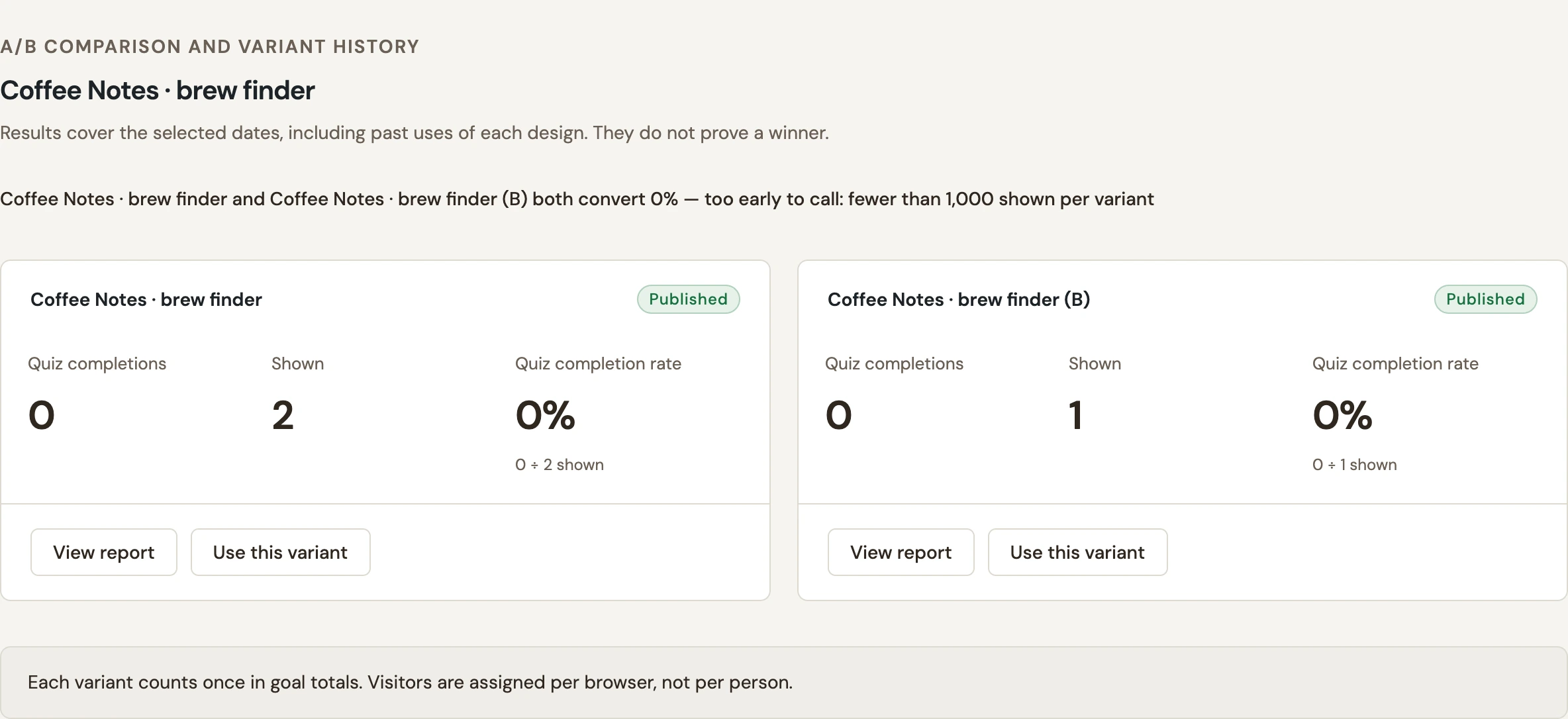
- Choose Compare variants.
- Read each version’s named result, Shown count and rate together.
 Enlarge screenshot
Choose which version stays active
- On the chosen version, select Use this variant.
- Read the confirmation and choose Use selected variant.
- Check the campaign statuses and revisit the live page in a fresh session.
- Confirm that the selected version appears and its form or link still works.
The selected variant becomes the campaign and takes its original name. Other variants are retired from the active list and can no longer be edited; their reporting history remains available. WConvert does not make this decision automatically for you. See campaign reports for date and metric basics.
Include your WConvert version, the page you tested and any error message.